


This week we shipped the GitHub Copilot SDK which takes the agent loop from the Copilot CLI and makes it easy to embed in other applications. We’ve been using, improving, and extending Copilot CLI for the last few months and it’s sparked new ideas about what it means to have the right context right where we work.
As developers, we spend most of our time in the terminal and our IDEs, and on most days, writing code isn’t the hard part. The hard part is everything around it: figuring out why something was built a certain way, tracking down a spec that defined a requirement, remembering which meeting introduced a change, or finding the right person to talk to when we have a question.
Tools like GitHub Copilot CLI already do a great job helping with code. But they don’t see the work around the work that led to the code, such as the design doc that shaped it, the meeting where a decision was made, or the person or team that owns it.
What if you could connect GitHub Copilot to have a deeper understanding of your team and work? So we started building just that.
Here are some examples and experiments we’ve been playing with. They’ve helped us save time, remove toil, and even inject some fun in some of the things we do manually every day:
Finding the right owner for a piece of code
Sometimes we get thrown into codebases we aren’t familiar with and git blamehas someone who’s not even on the project anymore. Rather than asking around, Copilot can surface ownership based on commit history, project context, and organizational knowledge including meetings, e-mails, and documents.
Creating an architecture diagram from a meeting transcript
When you’re trying to translate meeting discussions into a technical plan, capturing architecture details is slow and error‑prone. With Work IQ connected to Copilot CLI, Copilot can pull the meeting transcripts, understand components and relationships, and generate a draft architecture diagram.
Comparing an implementation to the original design spec
Instead of guessing or manually sifting through code, Copilot can look at the relevant design doc and call out where things changed, drifted, or didn’t get implemented as expected.
Bringing work context into your own apps
With the GitHub Copilot SDK (available in Technical Preview), you can also bring your work context into your own apps and projects, giving them access to an agent that understands your work, with just a few lines of code. Here’s using VS Code as an example:
When you’re deep in a task, switching tools to hunt for the latest docs, meeting notes, or related files interrupts your flow. This sample shows how a lightweight VS Code extension can automatically surface the content that matters – recent meetings, design docs, and relevant files from SharePoint or OneDrive – right inside the editor.
Getting set up
These examples are enabled by connecting GitHub Copilot to Work IQ, the intelligence layer behind Microsoft 365 Copilot.
To get started, you’ll need a GitHub Copilot subscription, and a Microsoft 365 subscription that includes access to Microsoft 365 Copilot. You will also need approval from your Tenant admin, for more details see the Work IQ MCP Server Repo. You can get a free M365 dev tenant through your Visual Studio subscription or the Microsoft 365 Developer Program.
Make sure you’re on the latest version of GitHub Copilot CLI (it’ll tell you if there’s an update pending), and use the following commands to install the Work IQ MCP server:
/plugin marketplace add github/copilot-plugins
/plugin install workiq@copilot-plugins
Restart the CLI, and you’ll see the Work IQ MCP server there!
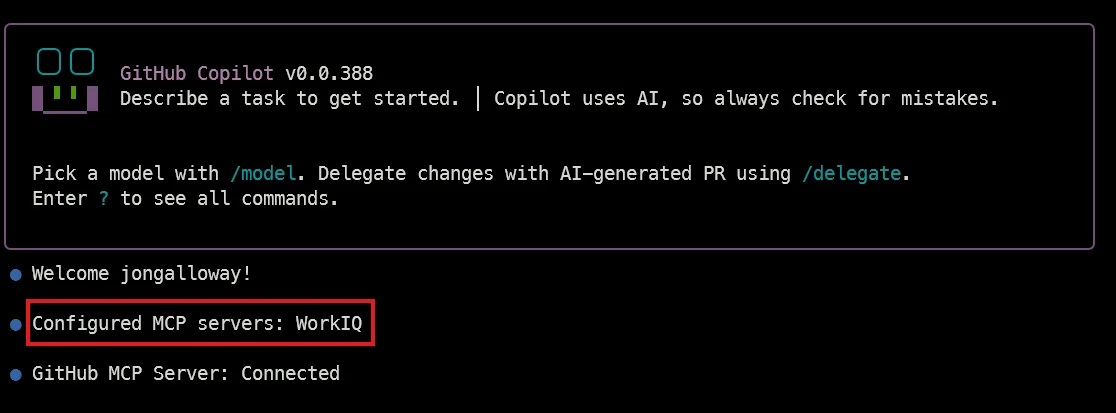
We’ve had a blast using GitHub Copilot to build things that help us be more productive. Check out Scott Hanselman’s video to see a great example of it in action. We’re excited to see what you build! Show off your experiments on social with #WorkIQBuilds and connect with us on GitHub to share your feedback.


Hey,
Can this work if our repo’s are stored in Azure DevOps? I have been using github copilot directly from IDE for some time, I have been experimenting with the independent CLI as per the video’s but can not access any repo’s in DevOps despite my account being linked – I’m not sure if I am missing something or trying to achieve the impossible/unsupported here.
Alan
Hi Kayla, can you share the VScode Extension on Marketplace for the “Focus Time” extension presented in the last video. Thanks
https://marketplace.visualstudio.com/items?itemName=burkeholland.aware